Managing computers across a business can become difficult as the number of devices grows. IT teams need to monitor systems, install updates, fix problems, and protect devices without visiting every location.
Cloud Based RMM makes this work easier. It lets IT professionals monitor and manage devices through an online platform. Teams can access the system from almost anywhere and respond to problems before they affect users.
What Is Cloud Based RMM?
Cloud Based RMM means Remote Monitoring and Management delivered through the cloud. It allows an IT team or managed service provider to monitor computers, servers, networks, and other connected devices from a central dashboard.
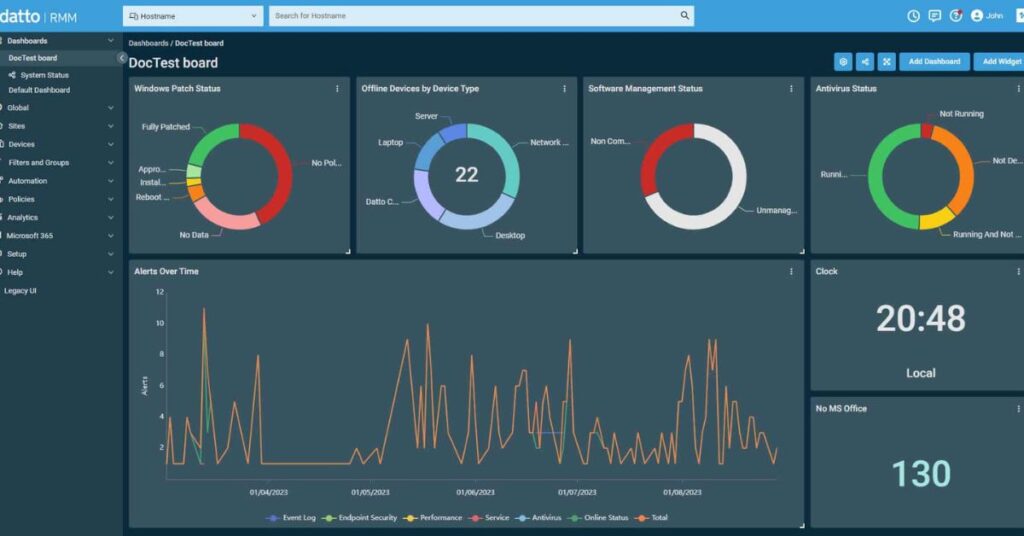
Instead of running the main RMM system on a local server, the provider hosts the platform online. Technicians can then access the management console through an internet connection.
The system can collect device information, detect problems, send alerts, and automate routine tasks. This gives IT teams more control while reducing the need for manual checks.
How Does Cloud Based RMM Work?
An RMM platform usually installs a small agent on each managed device. That agent collects information about system health and sends it to the cloud platform.
The platform analyzes that information and displays important details through a central dashboard. IT teams can then investigate alerts, apply updates, manage settings, and perform remote support tasks.
For example, an agent can detect low disk space or a stopped service and send an alert. The technician can respond before the problem causes a major interruption.
Main Features of Cloud Based RMM
Modern RMM platforms provide several features that help IT teams manage devices more efficiently. The exact features depend on the provider and subscription.
Remote monitoring tracks device health and identifies unusual activity. Automated alerts notify technicians when systems require attention.
Patch management helps teams deploy operating system and software updates. Remote access lets technicians connect to supported devices without traveling to the user’s location.
Many platforms also provide automation, reporting, software management, and basic security functions. These features help teams reduce repetitive work and respond faster.
Benefits of Cloud Based RMM
One major benefit comes from centralized management. Technicians can monitor many devices through one dashboard instead of checking each computer manually.
Cloud deployment also reduces the need for dedicated RMM infrastructure. The provider manages much of the platform’s backend, while the IT team focuses on managing its devices.
Automation saves even more time. Teams can schedule updates, create alerts, run scripts, and handle routine maintenance automatically. This approach helps technicians focus on more important problems.
Cloud Based RMM vs Traditional RMM
Traditional RMM systems may require businesses to maintain local infrastructure. That setup can increase management work and require additional hardware.
Cloud platforms move much of that infrastructure to the provider. IT teams can access the management console through the internet and avoid maintaining a dedicated RMM server.
| Feature | Cloud Based RMM | Traditional RMM |
| Infrastructure | Provider hosts it | Business may host it |
| Remote access | Internet-based | Often depends on local setup |
| Maintenance | Provider handles much of it | IT team handles more |
| Scalability | Usually easier | May require extra infrastructure |
| Updates | Provider manages platform updates | IT team may manage updates |
The right option depends on the company’s needs. Cloud RMM often suits businesses that want simpler deployment and flexible access.
Security Considerations
An RMM platform can access important systems, so security deserves serious attention. A compromised RMM account could give an attacker powerful access to managed devices.
Businesses should protect accounts with multi-factor authentication, strong passwords, and role-based permissions. They should also limit access to only the technicians who need it.
Choose a provider that explains its security controls clearly. Review logging, encryption, access management, and incident response features before selecting a platform.
How RMM Helps Managed Service Providers
Managed service providers can use RMM to manage devices for many customers from one platform. This allows technicians to monitor different environments without visiting every customer location.
Automation can help providers handle repetitive maintenance across many endpoints. For example, they can schedule patches, create alerts, and run approved scripts across selected devices.
This approach helps MSPs scale their services while keeping routine management under control. It can also help them identify problems before customers report them.
How Businesses Can Choose an RMM Platform
Start by identifying the devices you need to manage. Consider computers, servers, network equipment, and other supported endpoints.
Then compare important features such as monitoring, automation, patch management, remote access, reporting, integrations, and security controls. Also check how the provider charges for devices or users.
Do not choose a platform based only on its feature list. Test the interface and check how easily your team can manage real devices. A simple platform can often provide more value than a complicated system that technicians rarely use.
Common Uses of Cloud Based RMM
Businesses use RMM for many routine IT tasks. IT teams can monitor system performance, identify hardware problems, manage software updates, and respond to alerts.
Technicians can also use remote access to troubleshoot supported devices. This can reduce travel and shorten response times when users need assistance.
Automation creates another major use case. Teams can schedule maintenance tasks and apply standard actions across many devices instead of repeating the same work manually.
Frequently Asked Questions
What does Cloud Based RMM mean?
It means Remote Monitoring and Management delivered through a cloud platform. IT teams use it to monitor and manage devices remotely.
Is Cloud Based RMM secure?
It can provide strong security when teams configure it correctly. Businesses should use MFA, limit permissions, protect accounts, and select a provider with strong security controls.
Who uses RMM software?
Managed service providers, internal IT departments, and businesses use RMM platforms to monitor and manage computers, servers, and other devices.
Can RMM automate IT tasks?
Yes. RMM platforms can automate tasks such as alerts, patch deployment, maintenance scripts, and routine system checks.
Is cloud RMM better than traditional RMM?
Cloud RMM can simplify deployment and remote access. However, the best option depends on the organization’s infrastructure, security needs, and management preferences.
Final Thoughts
Cloud Based RMM gives IT teams a centralized way to monitor and manage devices. It combines remote access, alerts, automation, maintenance, and reporting through an online platform.
Businesses can use these tools to reduce manual work, respond to problems faster, and manage growing device fleets more efficiently. Before choosing a platform, compare its features, security controls, pricing, integrations, and ease of use.